

 Metering







 Mobile application




Some LoRaWAN sensors cannot send their data: they are too far from the gateway, installed underground or hidden behind thick walls. This is known as a white zone. There are two ways to reconnect these sensors: adding a LoRaWAN repeater or installing an additional gateway. The right choice mainly depends on the number of sensors to cover.
The LoRaWAN repeater
For a few isolated sensors, up to 16 per repeater. No Internet connection needed, but the sensors must support relay mode.
The additional gateway
For an entire area or a large number of sensors. It works with all LoRaWAN sensors, but requires a power supply and a network connection.
In this article
A sensor at the far end of an underground car park, a meter in a technical room, a probe at the edge of an industrial site: in the field, there are almost always a few devices the gateway cannot reach. Here is how to choose the right solution.
Why does a LoRaWAN network have white zones?
LoRaWAN is designed for long range: outdoors and in open terrain, a gateway can pick up sensors several kilometres away. But the actual range depends heavily on the environment. The most common causes:
Obstacles
Reinforced concrete walls, floor slabs, metal structures, terrain.
Basements
Car parks, cellars, boiler rooms, utility manholes.
Distance
Sensors at the edge of a site, on large grounds or in rural areas.
Gateway position
Placed too low or inside a building, it loses much of its range.
In these cases, the sensor does send its data, but it never reaches the gateway. A relay is then needed between the two.
Solution 1: enable LoRaWAN relay mode with a repeater
How does a LoRaWAN repeater work?
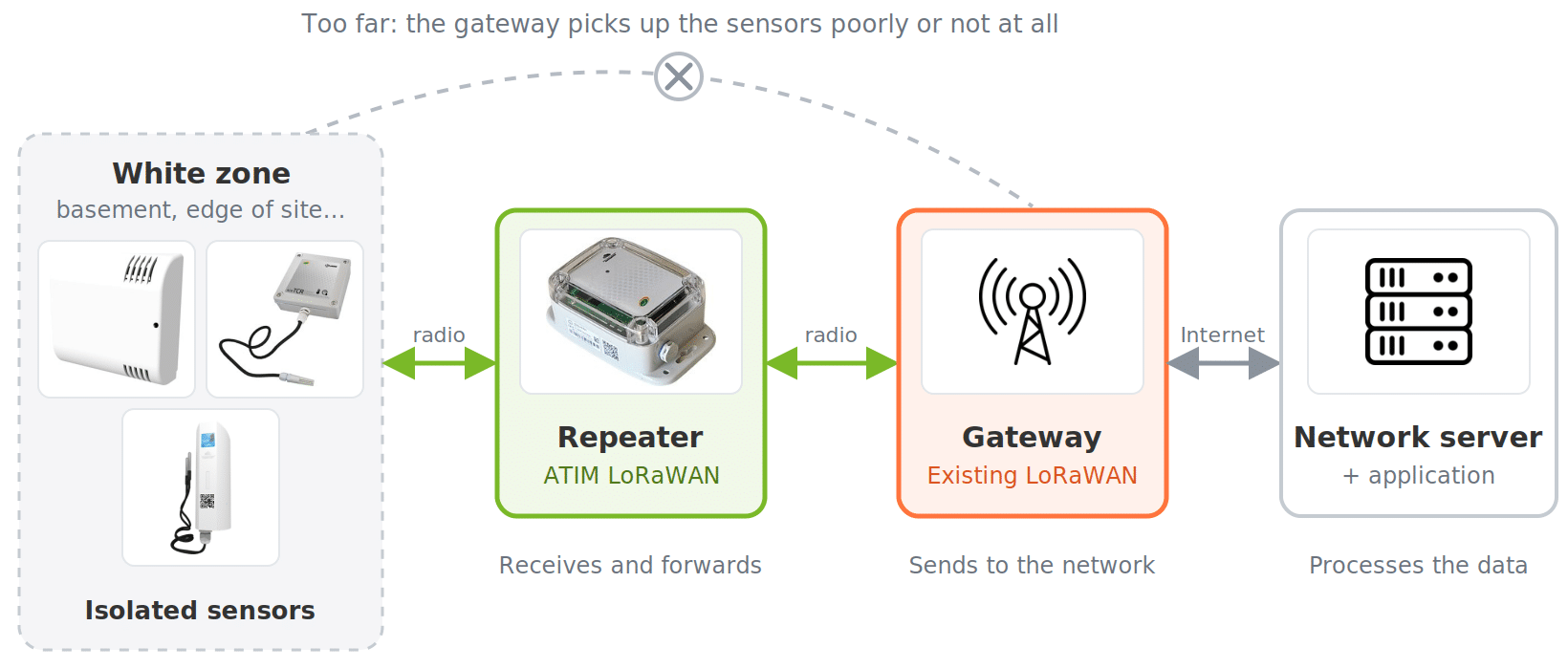
LoRaWAN relay mode is defined by the LoRa Alliance in the TS011 specification, published in September 2022. A repeater is placed between the isolated sensors and the gateway. It receives messages from sensors that are too far away, then forwards them to the gateway. It works both ways: uplink messages (from the sensor to the network) and downlink messages (from the network to the sensor).
The arrows go both ways: messages sent to the sensor (configuration, commands) follow the same path in reverse.
Benefits of the repeater
- ✓ No network connection to set up: the repeater communicates by radio with an existing gateway, without Ethernet, Wi-Fi or 4G.
- ✓ No changes to the gateways: they work with a relay without any update.
- ✓ Battery power possible: this is the case for the ATIM repeater, designed for several years of autonomy.
- ✓ Lower cost: a relay covers a white zone without investing in new infrastructure.
Limits and requirements
A repeater relays up to 16 sensors. Relay mode also has two requirements: the sensors must include the TS011 relay protocol in their firmware, and the network server must support this mode. Finally, going through an intermediary adds a radio hop, and therefore an extra transmission delay.
Solution 2: add a LoRaWAN gateway
How it works
An additional gateway is installed as close as possible to the uncovered area. It is connected to the network server via Ethernet, Wi-Fi or 4G, and picks up nearby sensors directly.
Benefits of the gateway
- ✓ High capacity: a gateway can handle a large number of sensors.
- ✓ No intermediary: messages go directly from the sensor to the gateway.
- ✓ No sensor requirements: any LoRaWAN sensor can connect to it.
- ✓ Wide coverage: it covers an entire area, not just a few spots.
Constraints
A gateway requires a permanent power supply and a network connection. Its installation is more demanding and its cost higher than a repeater. It is mainly worthwhile when many sensors are involved or when the network needs to grow over time.
Discover ATIM LoRaWAN gateways
Repeater or gateway: which one to choose?
The right choice mainly depends on the number of sensors to cover and the resources available on site.
| Criterion | LoRaWAN repeater | LoRaWAN gateway |
|---|---|---|
| Use case | A few isolated sensors (up to 16 per repeater) | An entire area or a large number of sensors |
| Compatible sensors | Sensors that support relay mode (TS011) | All LoRaWAN sensors |
| Network server | Must support relay mode | No specific requirement |
| Network connection | None, radio link with an existing gateway | Ethernet, Wi-Fi or 4G |
| Power supply | Can run on batteries | Permanent mains power |
| Cost | Lower | Higher |
In short: to quickly cover a basement or a sensor at the edge of a site, a repeater is enough, provided the sensors support relay mode. To extend the network permanently to a new building, a gateway is the better option.
The ATIM LoRaWAN repeater
The ATIM LoRaWAN repeater from the ACW range is designed to cover white zones without any building work. It supports LoRaWAN relay mode.
- ✓ Up to 16 devices relayed to the gateway.
- ✓ Battery powered: replaceable 3.6 V, 7.2 Ah lithium battery pack, for several years of autonomy. An external power option is available.
- ✓ IP66 enclosure for outdoor installation (Outdoor version ACW/LW8-RPT-O).
- ✓ External antenna option available.
- ✓ Plug & Play: local or remote configuration via downlink.
- ✓ Visual indicator showing network quality and sensor connection status.
Actual battery life depends on operating conditions: temperature, humidity, transmission frequency and network quality.
Best practices for extending LoRaWAN coverage
1Assess the situation: identify which sensors are not reporting, and where they are.
2Check the relay mode requirements: TS011-compatible sensors and a network server that supports relaying.
3Count the sensors to cover: a repeater relays up to 16.
4Install the gateway high up: on a roof or a high point to maximise its range.
5Place the repeater between the isolated sensors and the covered area: it must receive the sensors and be received by the gateway.
6Test the connection during installation: the ATIM repeater displays a visual indicator of network quality and sensor connection.
FAQ: LoRaWAN repeaters and network coverage
What is a LoRaWAN repeater?
It is a device that receives messages from LoRaWAN sensors out of the gateway’s range and forwards them. It covers a white zone without installing a new gateway.
What is the difference between a LoRaWAN repeater and a gateway?
The gateway is connected to the Internet and sends data to the network server. The repeater only relays radio messages to an existing gateway. It does not need an Internet connection and can run on batteries.
Does a LoRaWAN repeater work with all sensors?
No. With standard relay mode (TS011), the sensor must include the relay protocol in its firmware, and the network server must also support this mode. A repeater can then relay up to 16 sensors.
How long does a LoRaWAN repeater’s battery last?
It depends on the model. The ATIM repeater, powered by a replaceable lithium battery, is designed for several years of autonomy. Exact battery life depends on temperature, humidity, message frequency and network quality.
Can a LoRaWAN repeater be installed outdoors?
Yes, as long as you choose a suitable model. The Outdoor version of the ATIM repeater has an IP66 enclosure.
Conclusion
A white zone does not put an IoT project at risk. For a few isolated sensors, a LoRaWAN repeater reconnects them without setting up an additional network connection, provided they support relay mode. For a larger area or a growing fleet, a gateway remains the most robust solution.
Sensors not reporting?
The ATIM team can help you choose between a repeater and a gateway for your site.